Migrate Data Source to SQL Server
To migrate to SQL:
1. Have SQL DBA create a clean database on SQL Server. Have DBA create a user with DBO rights to the database, and get the username/password (SQL authentication) from the DBA (database administrator).
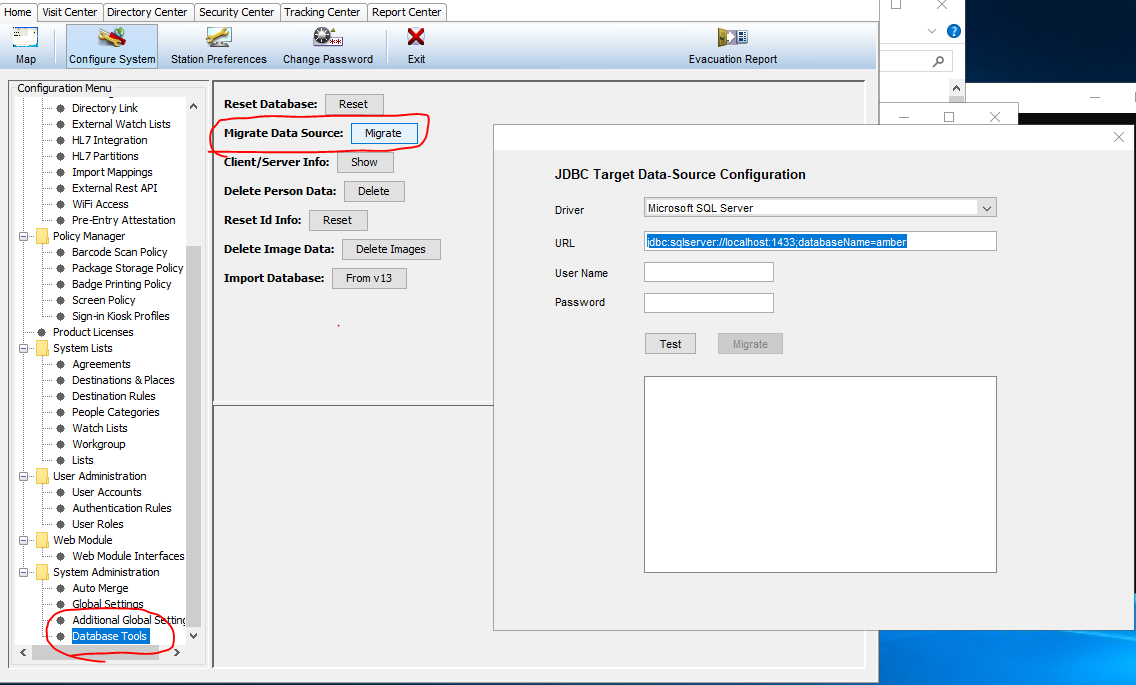
2. In Database tools => select Migrate data source (see screenshot below)
3. Set the JDBC Target Data Source Configuration (modify to reflect your SQL name, and DB):
String with SQL instance: jdbc:sqlserver://sql2014\sqlexpress;databaseName=ppglobal-migration
String with NO SQL instance: jdbc:sqlserver://sql2014;databaseName=ppglobal-migration
4. Select the "Test" button. You should see the "checking...." message.
5. Then select the “Migrate” button.
6. Have DBA check the database to make sure the schema is created and data is present.
7) Modify sqlcontext.xml to point to the new SQL server DB. see KB below:
8. Restart the PassagePoint service.