How to remove a Deny person

How to remove a Deny person

Do a look up in rapid reg and select more info > select the persons record > in the timed info window > change the type to notes.
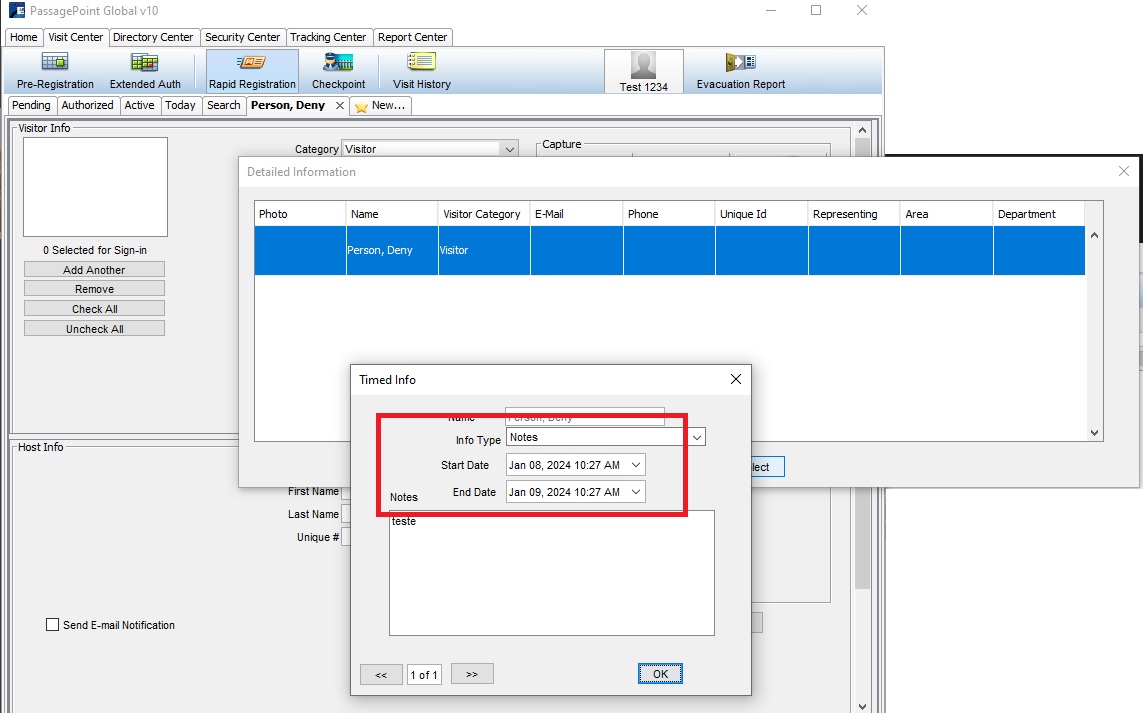
 

    • Related Articles

    • HL7 - Remove patient from lookup upon discharge

      By default, PassagePoint allows a patient that has been discharged to be looked up for up to 2 days. This behavior is for instances where a patient has discharged, but family members may not be aware and are still looking for the patient. This is a ...
    • How to enable merge function and manually merge a person record

      1) Log in as admin> go to home> configure system> user roles> edit the admin role> scroll down to the bottom> Check "Enable Merge on Person data> save the changes. 2) Exit PassagePoint and log back in 3) In the Rapid Reg screen, look up the person. ...
    • How to configure and add a watchlist person

      PasasgePoint's watchlist performs visitor screening against an internal watchlist By default it's set to visitor only. it's possible to set to host as well. Turn on alerts for Desktop client check the watchlist date Then if you are wanting the ...
    • HL7 Specifications (Inpatients)

      HL7 Port Port is configurable and can be any agreed upon port. FYI - The default port in the configuration is 2019 HL7 required segments and fields In general, PassagePoint requires the following: 1) The entire MSH segment is needed along with the ...
    • Import Users

      Attached two docs, one to import users and one for import users with user accounts